How to Use a Hipobuy Spreadsheet: Step-by-Step Tutorial
A Hipobuy spreadsheet turns "what should I buy?" into a delivered parcel. This step-by-step tutorial shows exactly how to use one — from browsing a category to submitting the link to Hipobuy.

Step 1 — Browse the spreadsheet by category
Open the Hipobuy spreadsheet and pick a category — shoes, hoodies, bags, watches and more. Each row is a real, agent-ready product link.
Step 2 — Check the product, price & QC photos
For each item, confirm the price (usually in CNY ¥) and look for QC photos — real buyer photos that show what actually arrives. Good rows have a working link and clear pictures.
Step 3 — Copy the product link
When you've found something you like, copy its product link. The link points to Taobao, Weidian, 1688 or Yupoo — the marketplaces Hipobuy supports.
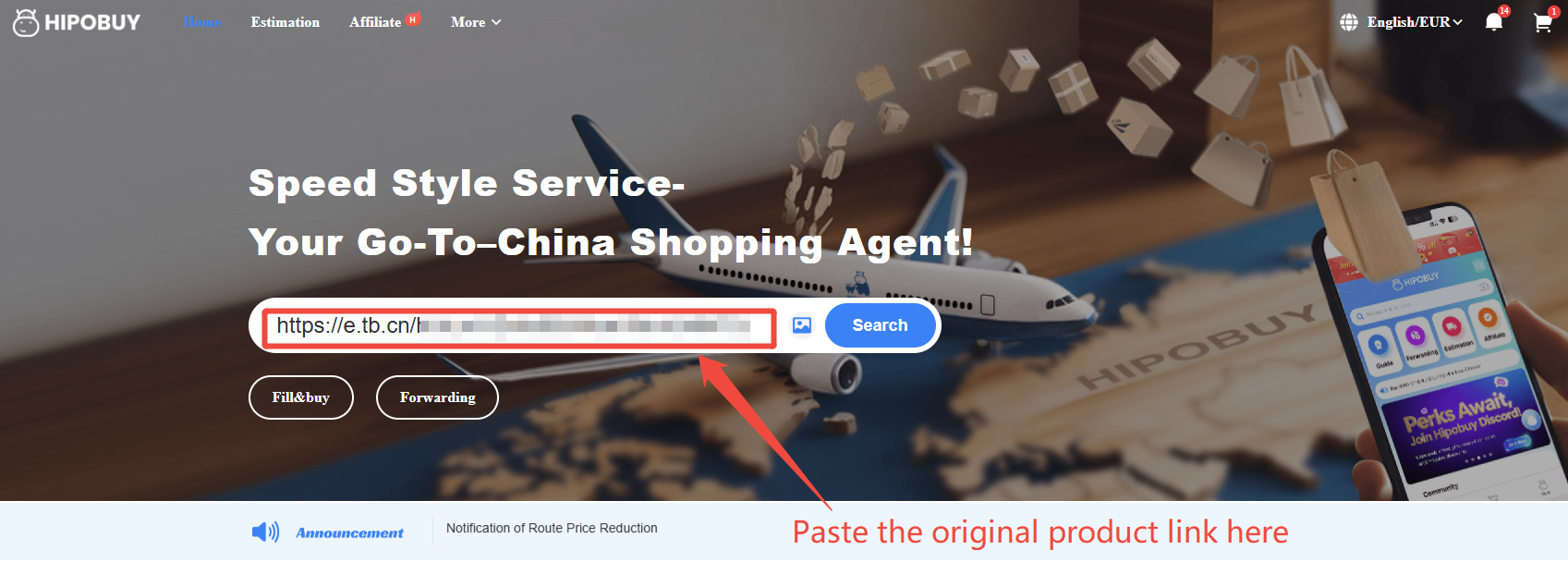
Step 4 — Paste the link into Hipobuy
On Hipobuy, paste the original product link into the search bar and submit it as a purchase order. Hipobuy's buyer places the order for you (often within 6 working hours).
Step 5 — Warehouse, QC & ship home
Once the item arrives at Hipobuy's warehouse, it's inspected and stored with QC photos. Submit an international parcel, pick a shipping line, pay freight, and track it home. See the full how to use Hipobuy walkthrough for details.
Tip: consolidate several spreadsheet finds into one parcel to cut international shipping. Read how to shop smart for choosing the right agent and line.