
Tutorial on using the forwarding function
This article mainly introduces how to correctly and quickly create a forwarding order. Welcome to read and unlock surprises!
1. Application Scenarios for Forwarding Orders
Domestic Users: If you need to send items to friends or family overseas, you can ship the package to the Hipobuy warehouse and use our convenient international logistics service.
Overseas Users: If you need to ship goods purchased from third-party platforms (e.g., Taobao, Weidian, JD.com) overseas, you can send the package to the Hipobuy warehouse and use our convenient international logistics service.
2. How to Create a Forwarding Order
Step 1: Go to the homepage, click "More" at the top of the page, and you will be redirected to the forwarding order creation interface.

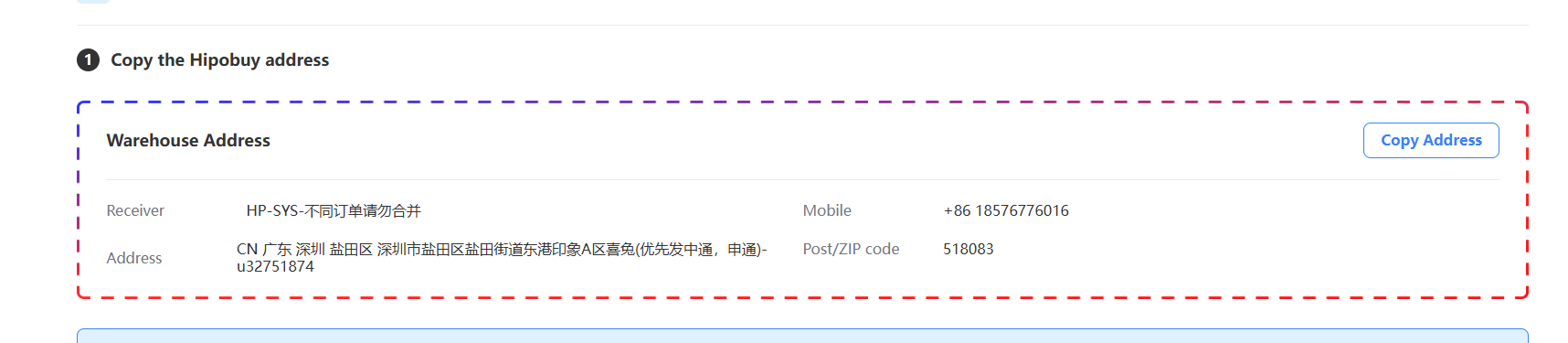
Step 2: On the forwarding order page, obtain the Hipobuy warehouse address and provide it to the sender (the product seller) so they can ship the item to this address. At the same time, request the tracking number from the sender.
Step 3: Fill in the tracking number information of the items to be forwarded as required on the page. Accurately entering the package tracking number maximizes the efficiency of order processing and product matching, reducing delays caused by incorrect information or additional confirmation requests from the Hipobuy team.
Step 4: After entering all tracking numbers, click "Submit" to generate the forwarding order. You can view it in "Orders".